 Gabble
Hold Right ⌥ and talk
From any app. A small pill shows it is listening. Tap the key once instead for hands-free; Esc cancels.
Gabble is dictation for Mac that runs on your machine. Hold a key, say what you mean, and clean text appears in any app. No account, no cloud, no subscription.
Free · v0.1.7 beta · 15 MB · signed and notarized by Apple · updates itself
um so I think we should uh move the the launch to Thursday
I think we should move the launch to Thursday.
Typing runs at about 40 words a minute and talking at about 150. Here is what Gabble does with the difference.
Three steps, and the first one is the only one you repeat.
From any app. A small pill shows it is listening. Tap the key once instead for hands-free; Esc cancels.
A Whisper or Parakeet model running on Apple Silicon turns speech into text, then Gabble strips the ums, applies your dictionary and formats it.
Let go and it is typed where you were working. Your clipboard is restored, and the dictation is saved to your local history.
The features people pay a subscription for, running on your own Mac.
Speech recognition runs on your Mac with Core ML. Audio is held in memory, never written to disk and never uploaded.
Slack, Mail, Notion, VS Code, Cursor, the browser. If you can type there, you can talk there. Your clipboard is put back afterwards.
NVIDIA Parakeet transcribes a ten-second thought in a fraction of a second on Apple Silicon. Text lands the moment you let go.
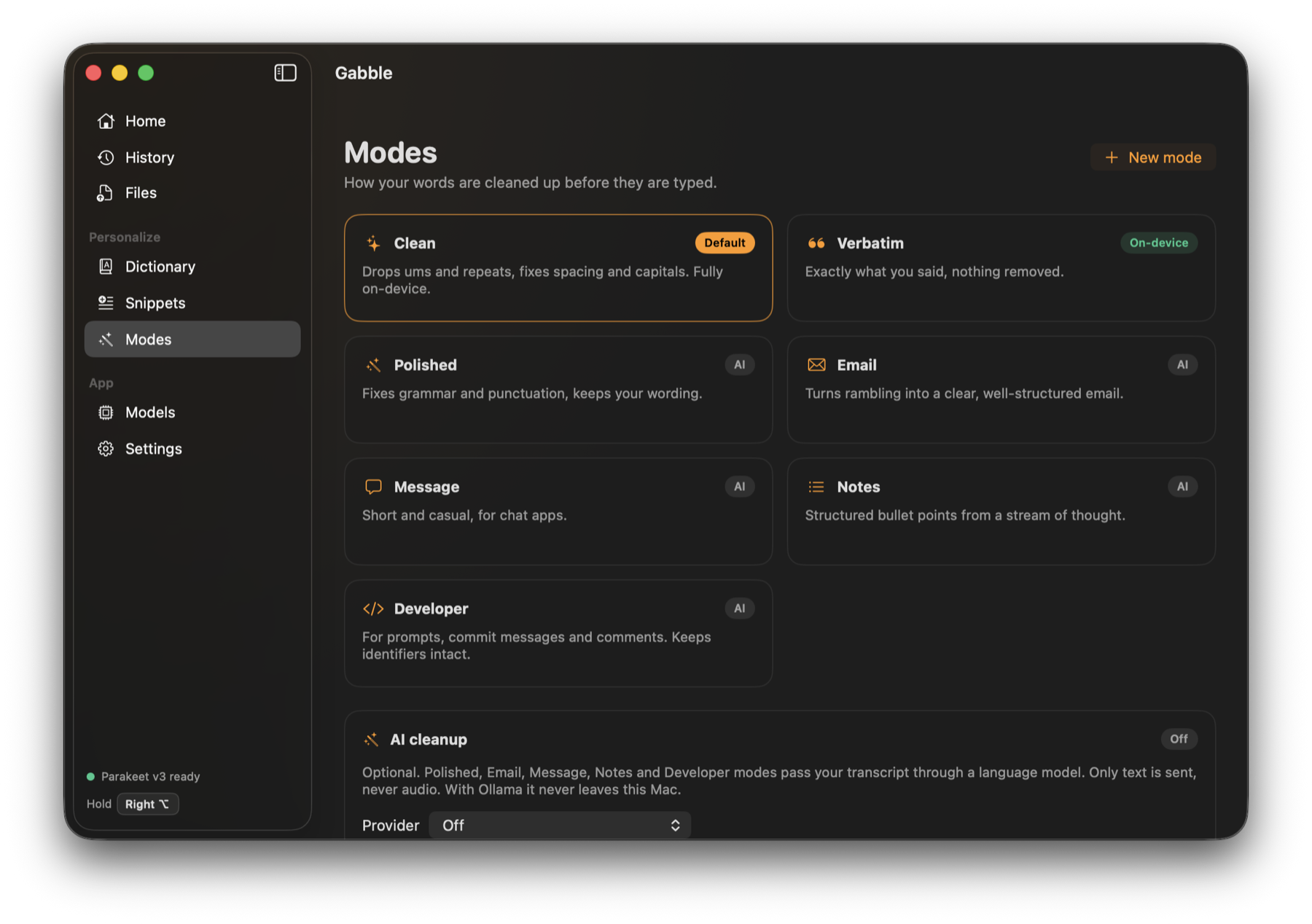
Clean, Verbatim, Polished, Email, Message, Notes, Developer, or your own. Gabble switches automatically: Email in Mail, Message in Slack.
Add names, brands and jargon once. Gabble fixes the spelling and casing every time, and corrects what it tends to mishear.
Say “my email address” or “calendar link” and get the full text. Works in the middle of a sentence.
Select text, hold Shift with the dictation key and say “make this shorter”. Needs AI cleanup turned on.
Drop a voice memo, meeting recording or video and get the transcript, processed on your Mac.
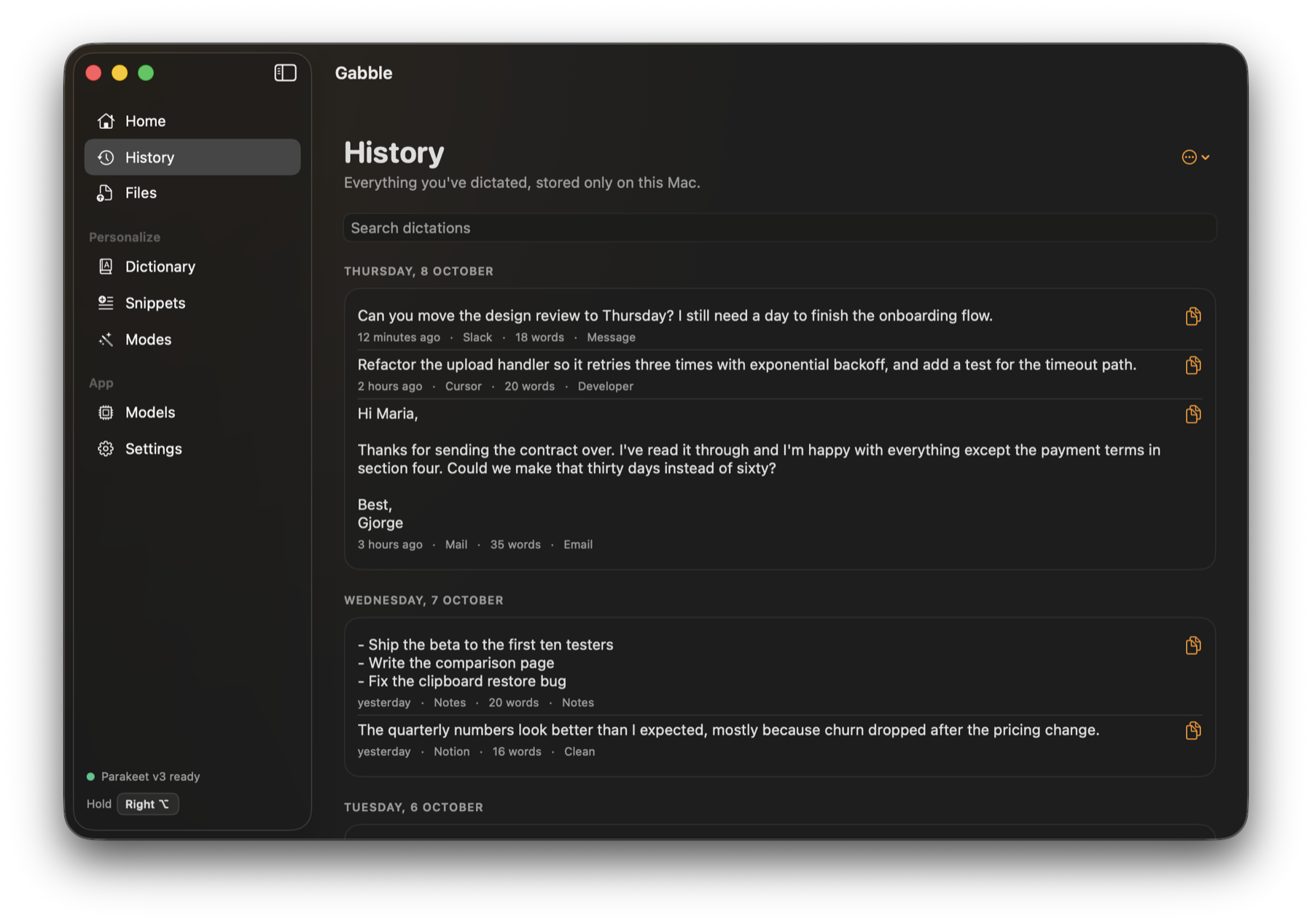
Search everything you have dictated. See your words per minute, time saved and streak. Keep it forever, a week, or not at all.
A native SwiftUI app that lives in your menu bar.
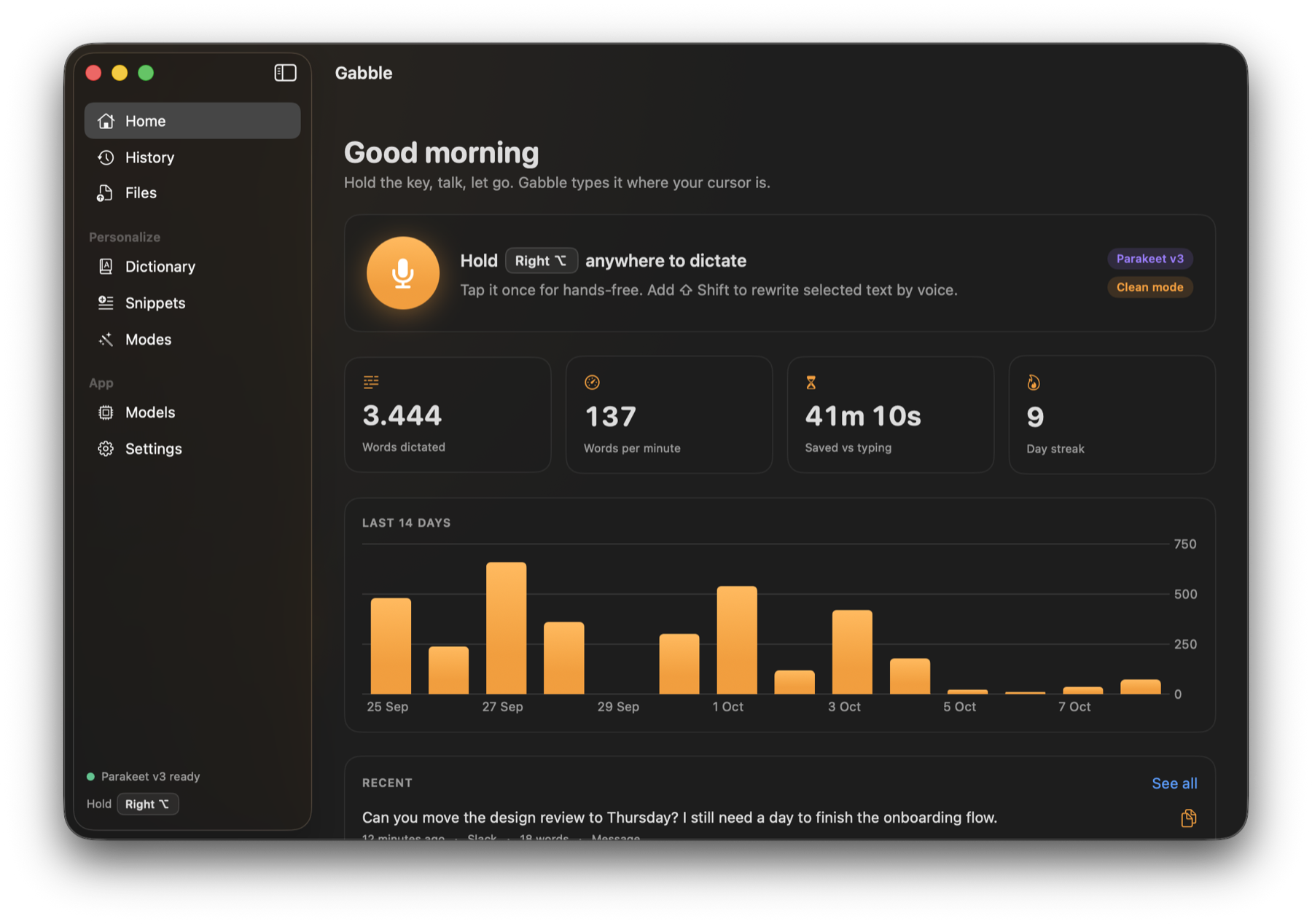
The dictation key, words dictated, words per minute, time saved and the last 14 days.
Email in Mail, Message in Slack, Developer in your editor.
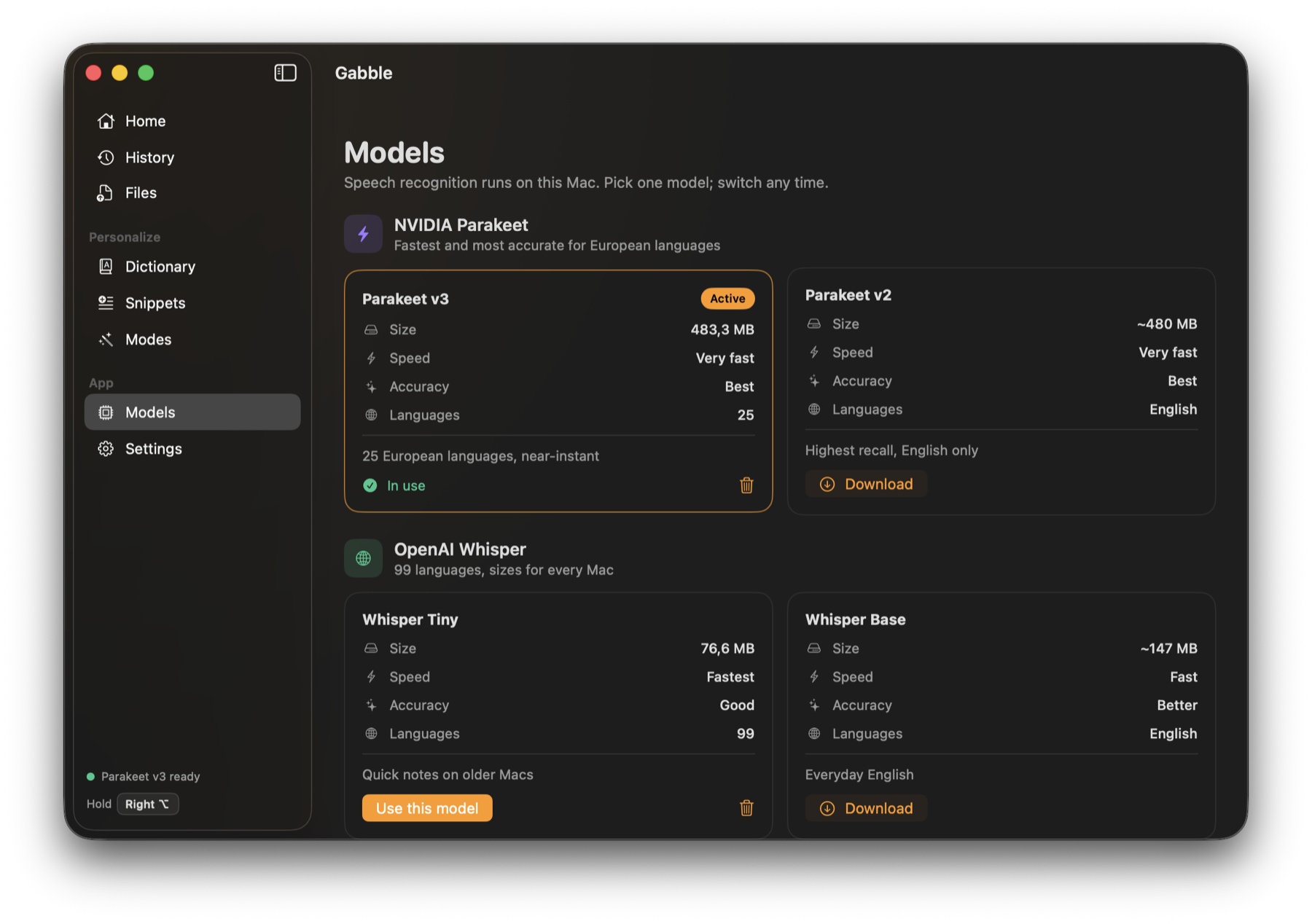
Download one, switch any time.
Everything you have dictated, grouped by day.
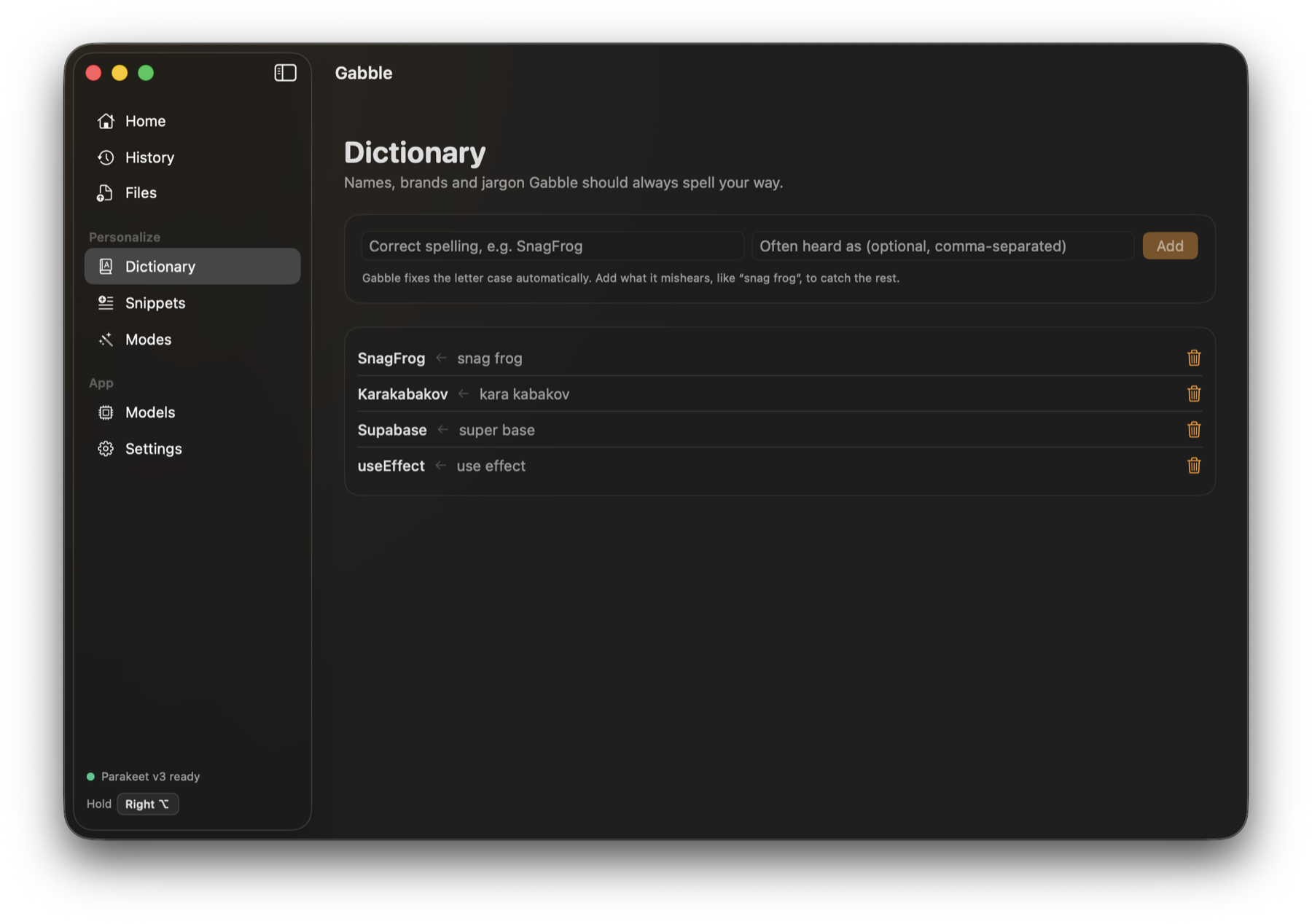
Names, brands and jargon, spelled your way.
Seven open models, all running locally through Core ML. Pick one, switch any time.
| Model | Size | Speed | Accuracy | Languages | Good for |
|---|---|---|---|---|---|
| Parakeet v3Recommended | ~480 MB | Very fast | Best | 25 | 25 European languages, near-instant |
| Parakeet v2 | ~480 MB | Very fast | Best | English | Highest recall, English only |
| Model | Size | Speed | Accuracy | Languages | Good for |
|---|---|---|---|---|---|
| Whisper Tiny | ~77 MB | Fastest | Good | 99 | Quick notes on older Macs |
| Whisper Base | ~147 MB | Fast | Better | English | Everyday English |
| Whisper Small | ~216 MB | Fast | Great | 99 | 99 languages in a small download |
| Distil Large v3 | ~595 MB | Fast | Excellent | English | Large-model accuracy, English only |
| Large v3 Turbo | ~646 MB | Fast | Excellent | 99 | Best Whisper quality, 99 languages |
Not sure which to pick? Read Whisper vs Parakeet.
Nowhere. That is the whole design.
The speech model runs on the Neural Engine and GPU. Audio lives in memory for the seconds it takes and is then dropped.
There is nothing to sign up for and Gabble has no analytics. History, dictionary and snippets are plain JSON files in your Library folder.
AI cleanup is off by default. Turn it on with Ollama to stay local, or with your own API key. Only text is sent, never audio.
Facts from each vendor's own site as of October 2026. Full write-ups in comparisons.
| Gabble | Wispr Flow | OpenWhispr | Apple Dictation | |
|---|---|---|---|---|
| Price | Free | Free tier with a weekly word limit; Pro from $12/mo billed annually | Free locally; paid plans for cloud features | Free, built in |
| Speech processed | On your Mac | In the cloud | On your Mac or in the cloud | On-device or Apple servers, depending on Mac and language |
| Account | None | See their site | Not needed for local use | None |
| Platforms | Mac (Apple Silicon) | Mac, Windows, iOS, Android | Mac, Windows, Linux | Apple devices |
| Read more | Gabble vs Wispr Flow | Gabble vs OpenWhispr | Gabble vs Apple Dictation |
Need Windows or a phone app? One of the others is the better pick, and the comparison pages say so.
Gabble is a free dictation app for Mac. You hold a key, speak, and the text is typed into whatever app you are using. Speech recognition runs on your Mac using Whisper and NVIDIA Parakeet models, so it works offline and your audio is never uploaded.
Yes. Gabble is free while it is in beta, with no word limit, no account and no trial timer. Because transcription happens on your Mac there is no per-minute server cost to pass on.
No. Audio is captured into memory, transcribed on the device and discarded. Nothing is written to disk or sent to a server. The only network requests are the one-time model download from Hugging Face, a daily check of this site for app updates and, if you turn it on, the optional AI cleanup, which sends transcript text only.
Any Apple Silicon Mac (M1 or later) running macOS 14 Sonoma or newer. Intel Macs are not supported.
Gabble lets you choose the speech model, removes filler words, applies your own dictionary and snippets, switches style per app, keeps a searchable history and can transcribe files. Apple Dictation is built in and shows text while you speak, which Gabble does not do yet.
Wispr Flow processes speech in the cloud on a subscription and works on Mac, Windows, iPhone and Android. Gabble runs on-device, is free, needs no account and is Mac only.
Parakeet v3 covers 25 European languages. The multilingual Whisper models (Tiny, Small, Large v3 Turbo) cover 99 languages. Parakeet v2, Whisper Base and Distil Large v3 are English only.
Yes. After the one-time model download, dictation, cleanup, the dictionary, snippets and file transcription all work with no internet connection. Only the optional AI cleanup with a cloud API key needs a connection; with Ollama it stays offline too.
You do not need it. The default Clean mode removes ums, repeats and fixes capitals on-device. AI cleanup is an optional extra pass that can rewrite a ramble as an email, notes or a chat message, using Ollama on your Mac or your own Anthropic or OpenAI-compatible API key.
macOS requires it for two things: noticing the dictation key while another app is in front, and pasting the text into that app. Without it Gabble still transcribes and copies the text to your clipboard.
Free, private, and set up in about a minute.
Download Gabble for MacRequires macOS 14 or later on Apple Silicon.